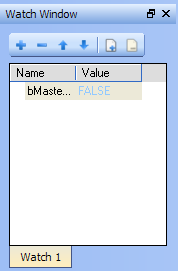
The KAS IDE"Integrated development environment" An integrated development environment is a type of computer software that assists computer programmers in developing software. IDEs normally consist of a source code editor, a compiler and/or interpreter, build-automation tools, and a debugger allows you to group several variables in a single watch window, and to have up to 10 different watch windows. Each of them is displayed as a tab with its own label.
Explanation for each icon:
| Icon | Description |

|
Add a variable with the PLC Variable Selector |

|
Remove a variable |

|
Move up the selected variable |

|
Move down the selected variable |

|
Add a new watch window Each window is displayed as a tab with its own label (Note that there is a limit of 10 tabs) |

|
Remove the selected watch window |
Table 4-1: Watch Window - List of Icons
You can also add an existing variable in the watch window directly by using drag-and-drop from the Dictionary or the PLC editors.
Each variable in the table widget has the following information:
| Field | Description |
| Name |
Lists the variables as well as structure, arrays and expressions. You can double-click a variable (or press F2 key when it is selected) to edit its name (except for structure and array members) |
| Value |
When the application is running, displays the variable or expression's value. You can double-click a value to force modification of the selected variable |
The contextual menu allows you to:
|
Stay Connected with Kollmorgen       
|
Copyright © 2015 Kollmorgen™ |

|